For people who review the same PDFs more than once
The client sent a new version. Which checks still stand?
PDFCarry shows which recorded accessibility checks still apply after a revision, and which need another look. Review the changes on your Windows computer, then export the PDF and its evidence.
Prefer the Microsoft Store? Get PDFCarry from the Microsoft Store. Same signed 0.2.3 release, same trial.
- Trial
- 14 days, no card, works offline
- Then
- US$349 per reviewer per year
- Handles
- Born-digital PDF 1.x, up to 50 MB and 200 pages
- Not yet
- Scans, forms, complex or changed tables
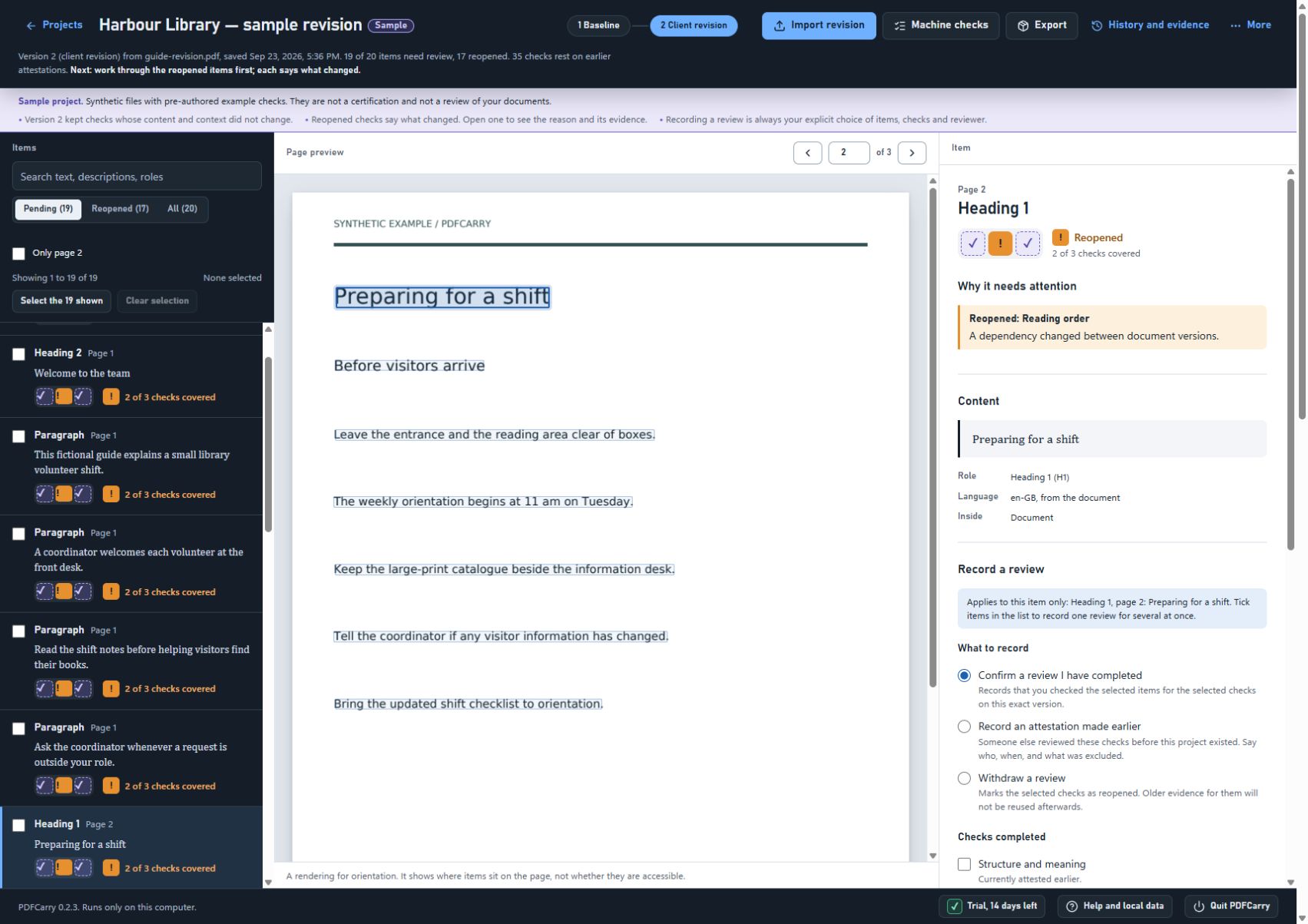
See it happen on a synthetic example
Two fixed examples generated from verified engine runs. This runs in your browser on prepared data; it does not process a PDF, and nothing you type leaves the page.
Read the complete worked example, with PDFs, evidence and a refused-table case.
The document
Items and their checks
✓ reviewed on this version ✓ reviewed earlier, still applies ! reopened – not yet reviewed
Baseline
Who it is for
Independent PDF accessibility reviewers and small agencies handling recurring client reports and guides. You already have a remediation editor; you want a record of which checks still apply when the next version arrives. If your existing workflow already handles that record, or a document never comes back, PDFCarry may add little.
It is not a general PDF editor and does not replace one.
Alongside your editor
You keep remediating in the tools you already use. PDFCarry sits beside them and looks after the record.
- Import the reviewed baseline and record which checks you completed, per item, under your own name.
- Import the client's revision. Checks whose content and context are unchanged keep their evidence. Changed or uncertain checks need fresh review, with the reason shown.
- Fix titles, language, descriptions and text roles in the app, or download the file, edit it elsewhere and reimport it.
- Export the PDF with a manifest of every check, who recorded it, when, and on which version.
Nothing is ever approved on your behalf. Saving a correction, importing a file or passing a machine check never records a review.
Where it fits
Rechecking PDF accessibility after a revision
Why a re-export undoes PDF-side work, why fixing the source file is the better answer when you control it, and a recheck list that works with any tool.
How PDFCarry compares with axesPDF, CommonLook and Equidox
Equidox also reuses work across revisions through Zone Transfer and Page Match. Compare that workflow with PDFCarry's review records, alongside the broader editing tools. Sources and limits are included.
What it supports today
The envelope is deliberately narrow and stated plainly. Outside it, the app refuses rather than guesses.
Handled in the app
- Born-digital PDF 1.x up to 50 MB, 200 pages and 20,000 structure elements.
- Tagged and untagged revisions with ordinary text, images, web links, supported drawings and grouped graphics.
- Complete, uniquely matched simple tables and lists.
- Corrections to text roles, title, language, image descriptions and link descriptions. Supported graphics without text can be marked decorative; appearance stays unchanged.
- Immutable version history, scoped review records, reimport from an external editor, machine validation, and ZIP export of PDF plus evidence.
Needs an external editor
- Scanned documents.
- Encrypted or signed files, interactive forms and XFA, PDF 2.x, and unsupported encodings.
- Complex or changed tables, mixed or stream-scoped structure, and content the engine cannot bind with confidence.
- Untagged grouped graphics that contain text.
- Recompressed files, changed resources or broad page dependencies may conservatively reopen review.
A validator pass covers the machine-checkable PDF/UA-1 rules. It is not accessibility certification and not a substitute for the checks you record.
How it runs
- Where
- On your Windows computer, as a local application. The PDF engines and the validator are bundled; there is no cloud account and no document upload.
- Your data
- Projects, versions and review records live in one data folder on your machine. Quit the app before copying the data folder to make a backup.
- Originals
- Every file you import is kept exactly as received. Corrections create new versions; nothing is overwritten.
- Evidence
- Reviewer names are local labels, recorded with each check. They are not authenticated identities, and the export says so.
- Now
- Version 0.2.3, released 23 September 2026 and signed by RYOX SALES PTY LTD. Its installer passed installation, real PDF work, restart, update and uninstall; the release notes list the tested Windows environments. Updates arrive as new versioned installers; there is no automatic updater.
Download and availability
PDFCarry 0.2.3 is available. The 14-day trial needs no card. The trial starts when you first open the application, needs no card and no internet connection, and never turns into a subscription by itself.
When the trial ends, the application stops creating projects, importing revisions, recording reviews and applying corrections. The projects you already have stay open, and you can still validate and export them. A subscription continues the work; its key goes into the application's Licence controls.
A subscription is US$349 per reviewer per year as the total, with GST included for Australian customers. Buy it on the billing page when the trial ends, or earlier. Full refund on request within 30 days of purchase or renewal. The customer guide describes the first revision, the trial and the licence as built. See the terms and refund policy.
PDFCarry 0.2.3 for Windows
US$349per reviewer per year, after a 14-day trial with no card
Released 23 September 2026. Windows x64 installer, 198.9 MB. Signed by RYOX SALES PTY LTD.
Or get PDFCarry from the Microsoft Store. The listing installs the same signed 0.2.3 release, with the same trial and subscription.
SHA256 of the installer. Compare it before you run the file.
a205836264c806564846f239c0493260b514f90e509335599647d5a02f1b6fa2
Release notes list the tested Windows environments and what changed. Installing an update or uninstalling keeps your projects and licence data.
Synthetic sample PDFs
The first pair changes an amount from 100 to 900. The control pair keeps the same visible content; its incoming heading tag is restored during transfer.
- Download changed-old.pdf, the tagged baseline
- Download changed-new.pdf, the client's revision
- Download control-old.pdf, tagged baseline
- Download control-new.pdf, unchanged-content revision
Generated for testing. They contain no customer content and no personal data. Sample provenance and embedded font licence.